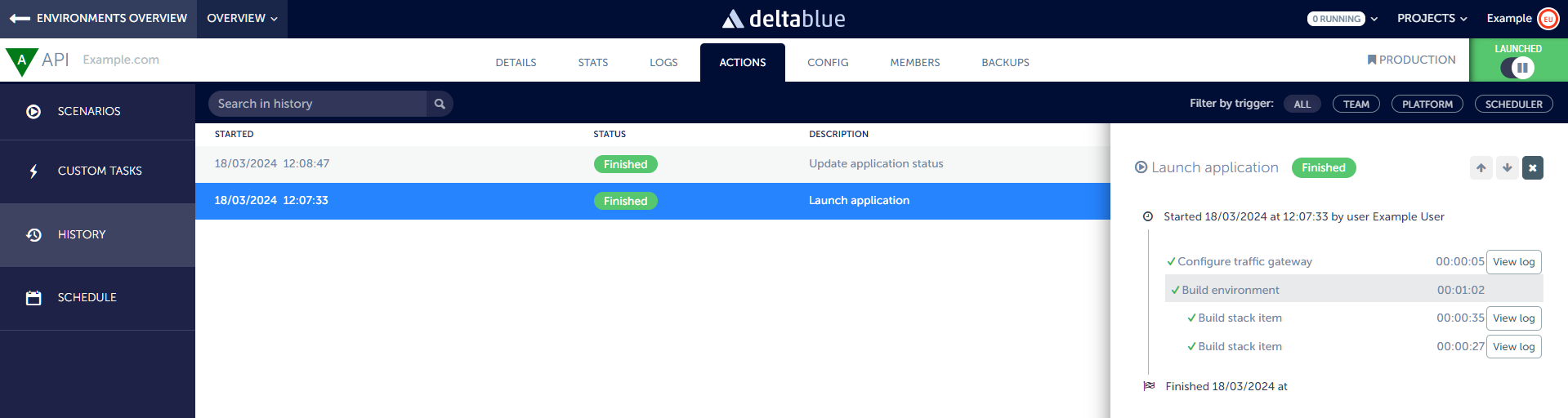
In the DeltaBlue Cloud Platform, users have the capability to review the output and history of scenarios, whether they are scheduled or manually triggered. This feature provides users with valuable insights into the execution of scenarios, allowing for monitoring and troubleshooting. Here's how you can utilize this functionality:
Accessing Scenario HistoryTo review the output and history of scenarios, navigate to the Actions and open the History tab.
Overview of Scenario HistoryWithin the scenario history screen, you will find an overview of all executed scenarios. This overview includes essential details such as the start date, status, description, duration, and the user who triggered the scenario.
Detailed Scenario InformationViewing the details for a specific scenario within the history allows you to access detailed information about that particular scenario.
This detailed view helps you to pinpoint any failed actions and identify the root cause of any issues that may have occurred during scenario execution. By reviewing the status of each task, you can determine which task caused the scenario to fail and investigate further by looking in the log files.